 admin
admin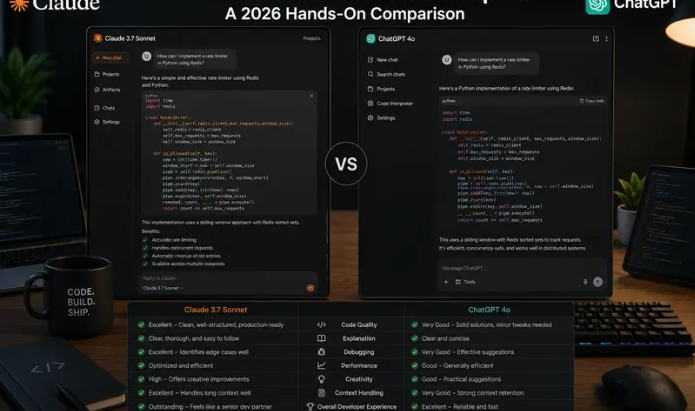
Every software developer now has a simple but critical question: which AI coding assistant deserves a permanent spot in your workflow? In 2026, Claude and ChatGPT have evolved far beyond basic code snippet generators. Both platforms offer agentic coding tools, deep IDE integrations, large context windows, and powerful reasoning capabilities. But they excel in very different scenarios. Instead of relying solely on synthetic benchmark scores, we ran a hands-on series of real developer tasks, testing both models on the exact work engineers complete every day: legacy code refactoring, architecture design, debugging tricky production bugs, writing unit tests, reviewing pull requests, and building small full-stack prototypes.
This comparison is built on practical experience, not marketing copy. We tested both Claude (Sonnet and Opus) and ChatGPT (latest GPT model) using identical prompts, the same code repositories, and consistent evaluation standards. Our goal was to answer one question: when you sit down to write, refactor, debug, and ship code, which tool will save you the most time and reduce costly mistakes?
Context Window & Long-Codebase Handling
One of the clearest divides between the two tools appears when working with large codebases. Claude’s long-context performance remains its standout strength. It reliably processes massive blocks of code, entire module folders, full spec documents, and thousands of lines of legacy code in a single conversation. When feeding it a sprawling old codebase, it retains details buried deep in the prompt and maintains consistency across dozens of interconnected files. For developers migrating legacy systems, auditing code, or reviewing full repository structures, this is a game-changer.
ChatGPT also supports extended context modes in 2026, but our testing revealed noticeable degradation with extremely large inputs. When given multi-file projects with hundreds of interdependent functions, ChatGPT occasionally loses track of minor constraints, variable naming rules, or edge cases hidden deep in the source code. It can still handle substantial code inputs well for most day-to-day tasks, but it is less dependable when precision is required across a huge body of code.
For developers working on monorepos or large legacy projects, Claude has the advantage. For smaller, isolated code files, the difference is far less noticeable.
Coding Performance: Refactoring, Debugging & Prototyping
We split our coding testing into three core developer workflows: refactoring messy legacy code, debugging obscure runtime errors, and building brand-new prototype applications.
Refactoring and Code Architecture
Claude outperformed ChatGPT consistently during multi-file refactoring challenges. We fed both models a tangled React + TypeScript codebase mixing UI rendering, data fetching and business logic. Claude cleanly separated concerns, extracted reusable hooks, created dedicated service files, and applied strict TypeScript interfaces without changing unrelated functionality. It respected existing project conventions and avoided unnecessary rewrites. When asked to refactor a 2,000-line legacy jQuery module to modern React, it preserved edge cases and error handling with fewer unexpected regressions.
ChatGPT can refactor code quickly, but it sometimes over-optimizes sections of code you never asked to modify. It occasionally introduces subtle bugs by changing dependencies or removing safety checks without warning. It works great for simple single-file cleanup, but complex cross-file refactors require more human oversight.
Debugging Production Issues
When faced with vague error logs and hard-to-reproduce bugs, both models are capable, but they use different approaches. ChatGPT shines at fast hypothesis generation. It quickly lists common root causes, suggests quick diagnostic commands, and drafts temporary fixes. It has excellent knowledge of niche libraries, obscure APIs, and lesser-known framework quirks. If you need to quickly identify why an API call fails or write a one-off debug script, ChatGPT often gives you usable answers faster.
Claude takes a slower, more methodical path. It reads through stack traces and surrounding code carefully, maps the flow of execution step by step, and flags hidden edge conditions you might have overlooked. It is less likely to invent non-existent functions or suggest incorrect fixes. For tricky, high-stakes production debugging where bad recommendations can break production, Claude’s cautious reasoning is a major benefit.
Rapid Prototyping & Boilerplate
This is where ChatGPT pulls ahead. If you need to spin up a simple script, scaffold a new API endpoint, generate boilerplate CRUD code, or quickly write test suites, ChatGPT returns usable code with low latency. Its ecosystem advantage is substantial: native integration with GitHub Copilot, VS Code plugins, thousands of custom GPTs, and broad knowledge across countless programming languages and frameworks. It handles small, isolated coding tasks with impressive speed.
Agentic Coding Tools & IDE Integration
Both platforms now feature native agentic coding capabilities. Claude Code, Anthropic’s built-in agent, can make changes across multiple files, run shell commands, execute tests, and iteratively fix errors within your local workspace. It excels at larger, multi-step engineering tasks, like implementing a new feature spanning backend, frontend and database layers.
ChatGPT’s agentic coding tools integrate seamlessly with OpenAI’s broader ecosystem. It works exceptionally well with computer-use capabilities, custom tools, and function calling. Many developers already rely on ChatGPT inside Copilot and JetBrains IDEs. Its ecosystem is broader, with more third-party plugins, community GPTs, and established integrations.
The practical difference: Claude’s agent is stronger for end-to-end project-level work, while ChatGPT’s agents are more flexible for mixing coding with multimodal tasks — reading screenshots of error messages, analyzing architecture diagrams, and generating mock UI images alongside code.
Documentation, Code Review & Pull Request Analysis
Code review is one of the most underrated use cases for AI developer tools. In our tests, Claude produced more thorough pull request reviews. It spots subtle security vulnerabilities, checks adherence to team style guides, highlights unhandled edge cases, and explains the reasoning behind every suggestion. It also writes detailed, consistent documentation and inline comments that match your project’s existing tone.
ChatGPT can also review pull requests, but its feedback tends to be more high-level. It will catch obvious bugs and style issues, but it sometimes misses nuanced security flaws or subtle logical errors buried deep in complex business logic. That said, it works faster for quick lightweight reviews and summary generation.
Pricing, API & Team Features
Both offer affordable personal subscription tiers around $20 per month, but API pricing and enterprise options differ significantly.
Claude’s API pricing is competitive for large context payloads, making it cost-effective when sending huge blocks of source code. Enterprise plans include robust privacy controls, SSO, audit logs and strong prompt injection resistance.
ChatGPT’s API has lower costs for standard-size prompts and supports fine-tuning, a feature still limited on Claude. OpenAI’s enterprise offering integrates deeply with Microsoft services, which is a major plus for teams already on the Microsoft stack.
Weaknesses of Each Tool
Neither assistant is perfect.
Claude’s main drawbacks: it can be slower to respond for simple small tasks. Its ecosystem is smaller than ChatGPT’s, with fewer community plugins and custom integrations. For very niche, newer libraries, its knowledge can sometimes lag slightly behind ChatGPT.
ChatGPT’s biggest pitfalls: it can confidently invent non-existent functions or API parameters (hallucinations), especially with complex multi-file work. On very large prompts, it can forget details from the start of the conversation. It is more prone to making unintended code changes during refactors.
Which One Should You Choose?
Pick Claude if:
- You work with large codebases, legacy migrations, or multi-file refactoring
- You need careful code reviews, security auditing, and detailed technical documentation
- You value strong long-context recall and precise instruction following
- You are building complex features using agentic coding workflows
Pick ChatGPT if:
- You write quick scripts, boilerplate code, small prototypes and unit tests daily
- You rely on IDE tools like GitHub Copilot and a wide plugin ecosystem
- You often combine coding with image analysis, screenshots, diagrams or multimodal tasks
- Your team is already invested in Microsoft and OpenAI enterprise tooling
The most common workflow among senior developers in 2026 is simple: subscribe to both. Use Claude for architecture planning, big refactors, and code reviews. Use ChatGPT for fast snippets, debugging quick issues, prototyping, and multimodal work. They complement each other rather than fully replacing one another.
Final Thoughts
In 2026, there is no universal “best” AI coding assistant. Claude and ChatGPT have taken separate paths to serve developers. Claude shines when projects are large, complex, and demand strict consistency across hundreds or thousands of lines of code. ChatGPT wins for speed, ecosystem breadth, multimodal workflows and fast boilerplate generation.
Before committing fully to one tool, test both on your typical workload. Run a real refactor task, upload your own repository, and see which one produces code that requires fewer manual fixes. For most professional developers, the optimal strategy is not to pick a single winner, but to keep both tools in your developer toolkit and use each for the jobs it was built to handle.






